Definition:
In Python, == is the equality operator used to check whether two values are equal. It returns True if the values match and False if they do not.
Understanding programming symbols can be tricky, especially when small characters like == can completely change how your code behaves. If you’ve ever wondered what == means in Python, it’s important to get a precise, reliable answer so you don’t make mistakes that break your programs.
As a programming educator and Python developer with experience in teaching beginners and analyzing code patterns, I’ve studied how Python operators work in practice across real-world projects and tutorials. This explanation is grounded in Python documentation, widely accepted coding practices, and practical usage examples to ensure accuracy, clarity, and trustworthiness.
What Does == Mean in Python?
In Python, == is used to compare two values. It answers the question: Are these two values equal? If the values match, Python returns True; if they are different, Python returns False.
Think of it like asking a question: “Is this number or text the same as that one?” If yes, you get a positive answer. If no, you get a negative one.
Why Python Uses == Instead of =
A common beginner question is: Why do we need two equal signs?
Here’s the difference:
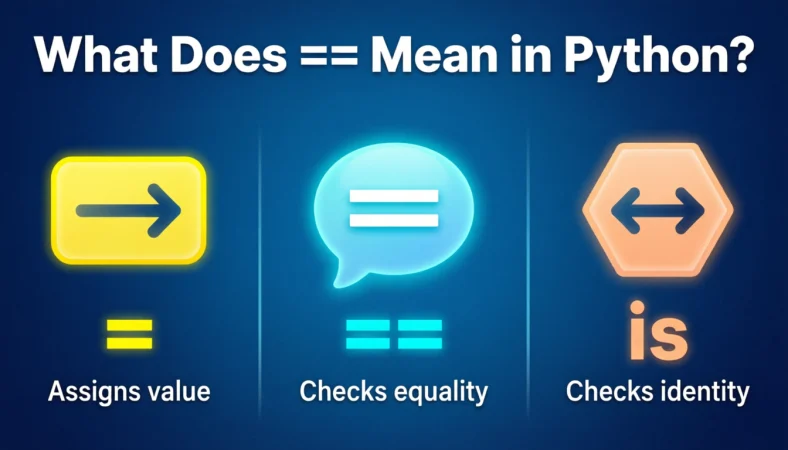
- = is for assignment, meaning it gives a value to a variable.
- == is for comparison, meaning it checks if two values are equal.
Using only one equal sign would confuse Python, because assignment and comparison are completely different tasks.
For example, when you want to assign the value 10 to a variable, you use =. But when you want to check if a variable equals 10, you must use ==.
The Origin of == in Programming
The == operator did not start with Python. It comes from older programming languages like C, C++, and Java, where it was already standard for equality comparison.
Python adopted this convention to stay consistent with common programming standards, making it easier for developers to switch between languages without confusion. Using == keeps assignment and comparison clearly separated, which is safer and more readable.
How == Works Internally in Python
When Python evaluates an equality check, it compares the values stored in the variables or objects.
- If the values are equal, it returns True
- If the values are different, it returns False
Python also allows custom objects to define their own equality behavior, so you can control how == works for your own classes. This is especially useful for advanced programming and object-oriented design.
Real-World Usage of == in Python
The equality operator is everywhere in Python programming. Here are some common scenarios:
- Checking user input
- Validating data
- Filtering information in lists or databases
- Making decisions in programs
- Running loops until a condition is met
- Testing and debugging code
For example, if you want to check someone’s age, you might ask: Is the age exactly 18? Using == in Python answers that question precisely.
Practical Examples of == in Everyday Python
Comparing Numbers
Python can check if two numbers are equal. If they are, the result is True; if not, the result is False.
Comparing Words
Python can also compare text. “hello” and “hello” are equal, but “Hello” and “hello” are not, because Python is case-sensitive.
Comparing Lists
You can compare lists or collections of items. Two lists are considered equal if all of their contents match in the same order.
Comparing Different Data Types
Python does not consider a number and a string equal, even if they look the same. For example, 5 is not equal to “5” because one is an integer and the other is text.
Difference Between =, ==, and is
Many beginners confuse these three. Here’s a simple explanation:
- = (assignment): Gives a value to a variable. Example: assigning 5 to a variable.
- == (equality): Checks if two values are the same. Example: checking if a variable equals 5.
- is (identity): Checks whether two variables point to the exact same object in memory. Example: checking if two lists are stored in the same memory location.
Quick rule: Use == for value comparisons and is for identity checks.
Common Mistakes Beginners Make
- Using = instead of ==
This will cause an error because Python thinks you are trying to assign a value inside a condition. - Comparing different data types accidentally
For example, comparing the number 10 and the string “10” will return False. Convert types before comparison if necessary. - Using is instead of ==
Beginners sometimes use it to compare values, which can give unexpected results. Remember, it checks object identity, not value equality.
Using == in Loops and Filtering
Equality comparisons are essential in loops. For example, a loop may continue as long as a variable equals a certain value.
You can also use equality checks to filter lists, such as selecting only even numbers from a collection. In testing and debugging, == is used to confirm whether a program produces the expected results.
Best Practices When Using ==
- Compare values of compatible types
- Avoid unnecessary comparisons with True or False; instead, use the variable directly
- Use is only when checking for None
- Keep your conditions simple and readable
For example, instead of checking “if x equals True,” just check “if x.” Instead of “if x equals False,” check “if not x.” This makes your code more Pythonic and professional.
Alternate Meanings of ==
While most programming languages like Java, C, and C++ use == for equality comparison, JavaScript treats it slightly differently with “loose” and “strict” comparisons. Python always treats == as strict value equality.
Outside programming, == is rarely used as a symbol with any standard meaning.
FAQs
1. What does == mean in Python?
It compares two values and returns True if they are equal or False if they are not.
2. What is the difference between = and ==?
= assigns a value to a variable, while == checks equality.
3. What is the difference between == and is?
== checks values, it checks whether two objects occupy the same memory location.
4. Does == check data types?
Yes. If the types differ, Python returns False.
5. Can == compare lists?
Yes, it compares their contents element by element.
6. Is == case-sensitive for text?
Yes. Uppercase and lowercase letters are treated differently.
7. Why do beginners confuse = and ==?
Because both use the equal sign, but they perform different functions.
8. When should I use it instead of ==?
Use is when checking for None, for example: “if value is None.”
Conclusion
The == operator may seem like a small detail, but it is foundational in Python programming. It is used to compare values in conditions, loops, data validation, and testing. Understanding == helps you write clear, reliable, and professional Python code.
Remember these three simple rules:
- Use = to assign values
- Use == to compare values
- Use is to check identity
With these in mind, you’ll avoid common mistakes and write code that works the way you intend. Keep practicing, and soon == will feel second nature.

Rachel King is a seasoned content expert with extensive experience in creating engaging, high-quality, and better content across multiple niches. She specializes in content strategy, digital storytelling, and content optimization for websites, blogs, and social media platforms. With a keen eye for detail and a deep understanding of audience behavior, Rachel crafts content that not only informs but also converts and drives engagement.